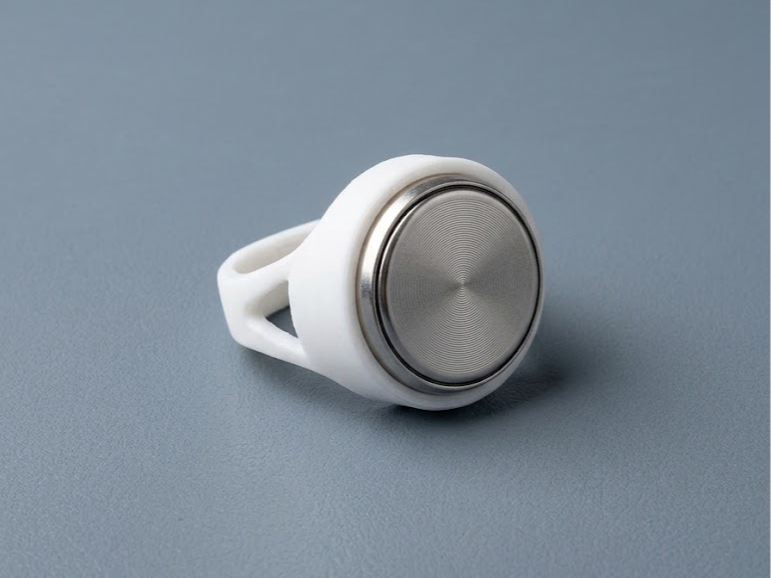
Your intercom key, on your finger. A minimalist signet ring that holds a Dallas / iButton-style contact tablet (the "Touch Memory" key used by intercoms and door locks) instead of a stone. The tablet sits 2 mm proud of the bezel, so it reaches the reader's contact pad without the ring touching the panel. How it holds the tablet — no glue, no clips, one part The bezel is a through cone. The tablet goes in from the inside of the ring, base first: the wide base wedges into the 6° cone exactly at finger level, the body comes out through the top window. Your finger keeps it pressed into the seat; the taper is self-locking (6° is below the friction angle), so the tablet does not rattle or fall out. To remove: take the ring off and push the tablet down into the finger hole. Insertion (ring off the finger): hold the ring band up, slide the tablet in from the front under the head with the base about 1 mm above the middle of the finger hole, centre it under the cone, push it up until it seats. Compatibility — measure your tablet first Designed for tablets with the wider rim on the BACK (blind) side: body Ø 16.3 mm; base rim Ø 17.3 mm, 0.6 mm thick, on the non-contact side; total height 6.2 mm. Standard Dallas DS1990A-F5 cans have the rim on the CONTACT side and will not seat in this version. The Fusion 360 model is fully parametric (tablet dimensions, cone clearance, ring size), so other tablets and sizes can be generated — ask in the comments. Ring Size 18 (inner Ø 18.0 mm), band 6 × 2 mm, head Ø 19 mm, only 4.2 mm above the finger. Head wall 1.2 mm, cone 5°, triangular cut-outs in the shoulders, all edges filleted. ~1 g of PETG.
iButton Ring – Wearable Intercom Key
by nullhtp · original on MakerWorld ↗
♥ 4⬇ 3🖨 5 prints
Print profiles
0.12mm layer, 4 walls, 40% infill
⏱ 34m · 2 g · 1 material(s)
Prints on: A1 0.4, X1E 0.4, X1 0.4, P2S 0.4, H2D Pro 0.4, P1P 0.4, X1 Carbon 0.4, A1 mini 0.4, H2D 0.4, P1S 0.4, H2C 0.4, X2D 0.4, A2L 0.4, H2S 0.4PETG
Not in stock