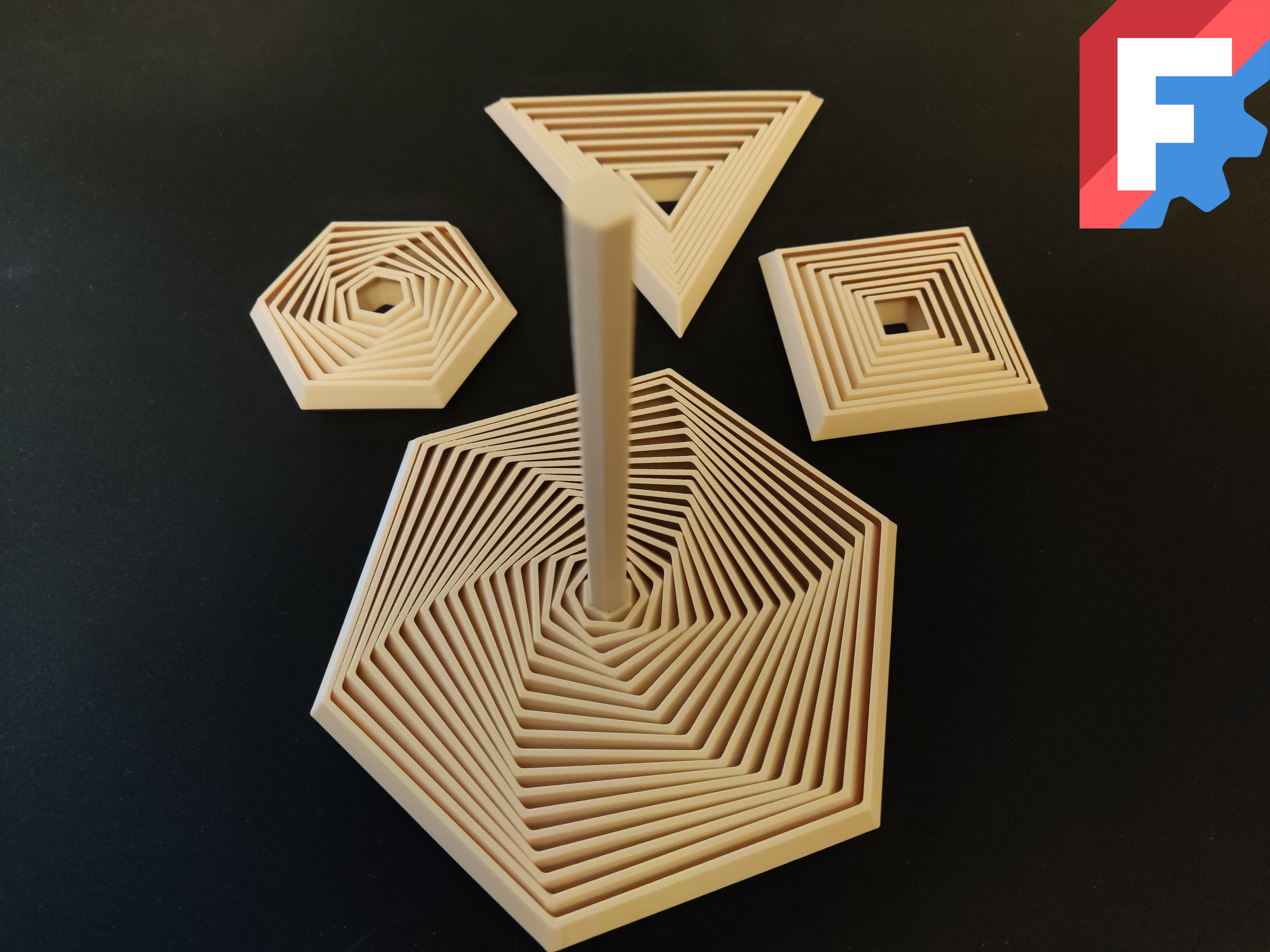
A fully parametric polygon fidget.
Printing tips:
Decrease the printing speed
Decrease the cooling fan's speed
For a robust handle use 3 walls
Ensure a good bed adhesion
How to customize your own?
You will need to download FreeCAD, a free to download/use CAD software.
After opening the file you will see the parts of the fidget in the left upper corner. Its a hierarchical list. Clicking on "VarSet" will display all the available parameters you can customize.
The parameters (and tips):
The generation is not foolproof, so avoid setting incorrect values (otherwise FreeCAD/The fidget might glitch out)! Moreover the generation can be slow for large fidgets.
Sides: The number of sides of the polygon
Set this higher than 2!
Segment Count: The number of segments/layers the fidget has
Since the fidget is generated from the outermost wall towards the inside, avoid setting this too high. Start with a small value and increase it gradually. If you want a handle as well, then make sure the middle segment is wide enough to twist the whole fidget with itself (if it is too small, then it will be able to turn independently inside the fidget).
Spacing: The distance between 2 neighbouring segment/layer
1.1 mm works fine for smaller fidgets, but giant ones might need smaller values. Higher values result in more flexibility, but also in higher risk of the fidget falling apart.
Wall Angle: The angle of a segment's "elbow"
120 degrees was a sweetspot for me. Higher values result in more flexibility, but also in higher risk of the fidget falling apart.
Wall Width: The segments' wall width
Should be at least 2 times your nozzle size, but 3 times is better for bed adhesion.
Outer Wall To Center: The distance between the outermost segment and the center
Set this according to the segment count to avoid FreeCAD glitching out.
Height: The height of the fidget without the handle
Low values may make the segments dislodge from each other.
Handle Radius: The radius of the handle (wall to center distance)
Make sure it is small enough so the handle stays on the middle piece segment.
Handle Height: The height of the handle
Set it as high as you want.
To make sure the fidget doesn't fall apart, set the "Spacing", "Wall Angle" and "Height" parameters accordingly to the tips i wrote above.
The handle and the solid middle
If you want the middle empty or don't need the handle, then select the appropriate Body Part in the hierarchical list under the Body:
WithoutSolidMiddle
WithSolidMiddle
WithHandle
Then hit Ctrl + e to export it or Top Menu bar -> File -> Export...
As an alternative you can delete it in the slicer as well:
Import and select the fidget
Right click it -> Split -> To Parts
Then delete the part you dont need
Inside out fidgets
By setting the wall angle higher than 180 degrees (240 for instance) you can make "inisde out" fidgets with it (For an example see the last 2 pictures or the sample fidget).
Happy Printing and customizing!
Polygon fidgets - fully customizable (triangle/square/pentagon/hexagon/heptagon/octagon/nonagon/etc)
by Marcidy · original on Printables ↗
Toys & Games / Other Toys & Games
♥ 159⬇ 3.8k🖨 3 prints
Print profiles
SmallHexagon_NoHandle.stl
⏱ time and weight estimated after preparation · 1 material(s)
Made to order: we prepare this file when you order, which adds a few minutes before printing starts.
Prints on: A1 mini 0.4PLA
Order this print
MediumTriangle_WithHandle.stl
⏱ time and weight estimated after preparation · 1 material(s)
Made to order: we prepare this file when you order, which adds a few minutes before printing starts.
Prints on: A1 mini 0.4PLA
Order this print
SmallPentagon_NoHandle.stl
⏱ time and weight estimated after preparation · 1 material(s)
Made to order: we prepare this file when you order, which adds a few minutes before printing starts.
Prints on: A1 mini 0.4PLA
Order this print
SmallSquare_NoHandle.stl
⏱ time and weight estimated after preparation · 1 material(s)
Made to order: we prepare this file when you order, which adds a few minutes before printing starts.
Prints on: A1 mini 0.4PLA
Order this print
MediumPentagon_WithHandle.stl
⏱ time and weight estimated after preparation · 1 material(s)
Made to order: we prepare this file when you order, which adds a few minutes before printing starts.
Prints on: A1 mini 0.4PLA
Order this print
MediumSquare_WithHandle.stl
⏱ time and weight estimated after preparation · 1 material(s)
Made to order: we prepare this file when you order, which adds a few minutes before printing starts.
Prints on: A1 mini 0.4PLA
Order this print
MediumHexagon_WithHandle.stl
⏱ time and weight estimated after preparation · 1 material(s)
Made to order: we prepare this file when you order, which adds a few minutes before printing starts.
Prints on: A1 mini 0.4PLA
Order this print
SmallHeptagon_NoHandle.stl
⏱ time and weight estimated after preparation · 1 material(s)
Made to order: we prepare this file when you order, which adds a few minutes before printing starts.
Prints on: A1 mini 0.4PLA
Order this print
SmallTriangle_NoHandle.stlDEFAULT
⏱ time and weight estimated after preparation · 1 material(s)
Made to order: we prepare this file when you order, which adds a few minutes before printing starts.
Prints on: A1 mini 0.4PLA
Order this print
MediumHeptagon_WithHandle.stl
⏱ time and weight estimated after preparation · 1 material(s)
Made to order: we prepare this file when you order, which adds a few minutes before printing starts.
Prints on: A1 mini 0.4PLA
Order this print
InsideOut_PentagonFidget.stl
⏱ time and weight estimated after preparation · 1 material(s)
Made to order: we prepare this file when you order, which adds a few minutes before printing starts.
Prints on: A1 mini 0.4PLA
Order this print