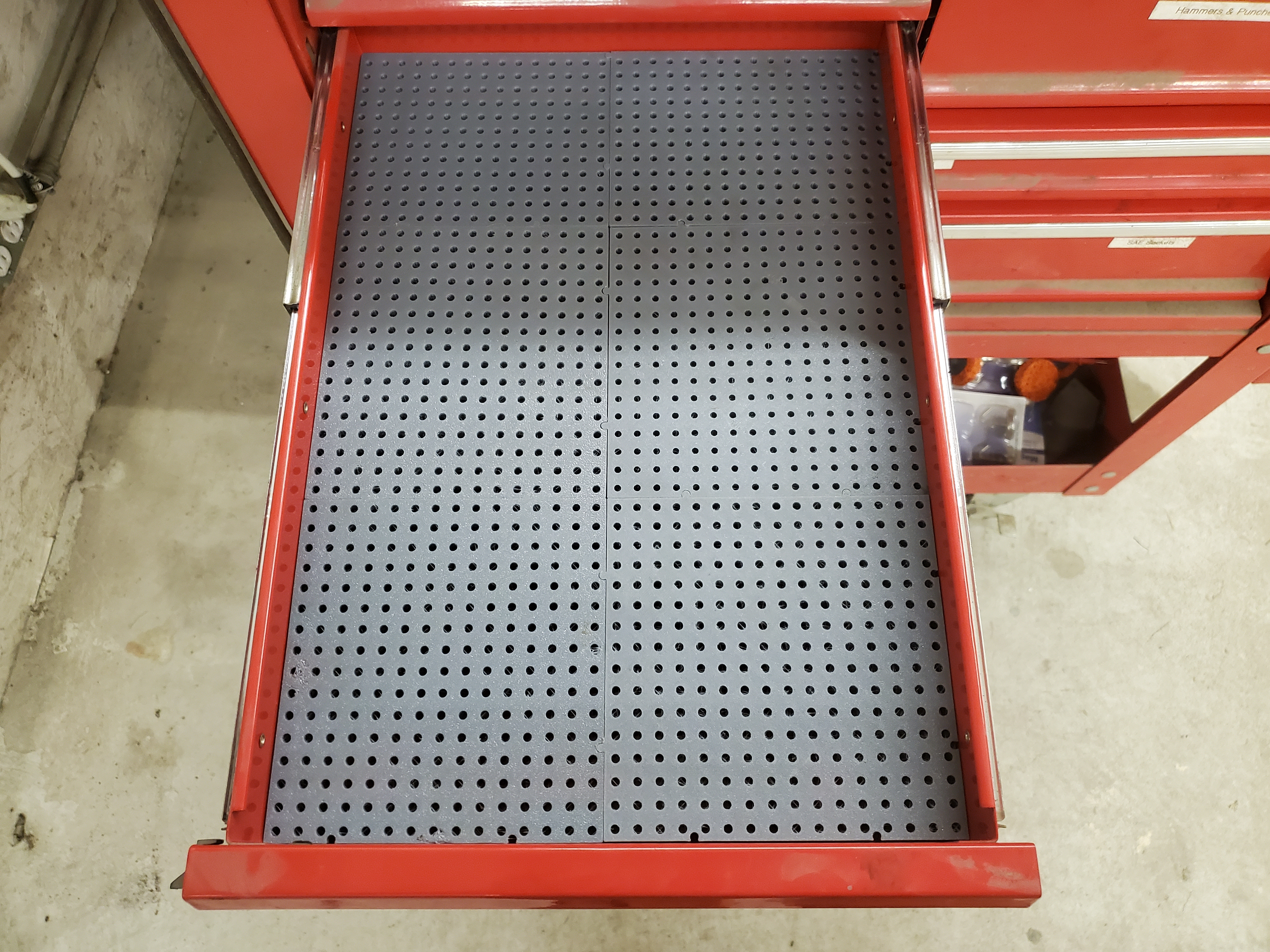
Toolgrid Board
Note - MaxTheSpy has updated his model with additional improvements and better explanations of the settings than what I have. You may find it easier to use: https://www.printables.com/model/884488-opengridmount-custom-grid-board-toolgrid-toolify3d
Easily create toolgrid board sets to fit your drawers. Enter the drawer width and length, and the generator will calculate how many full size tiles are needed, then side and end tiles are generated to fill the remaining space. A corner tile is also generated. Don't forget to leave a little clearance - I recommend making the grid 2-3mm smaller than the drawer.
In preview mode, all tiles for the drawer will be shown. Alternating tiles are colored differently for better visibility. If you check the box for distinct tiles, only one of each shape will be produced when rendering. Tiles will be marked with the quantity you will need to print, as well as the type of tile (base, back, side, corner).
When side and back tiles will be small, the previous tile is expanded up to the maximum size set (see below). If there is no locking tab on the corner tile, it will be added to the side or back tile (whichever is smaller) when rendering.
Lite mode thins the back side in the middle for a 30% savings on filament & print time. Lite tiles print upside down (top surface on build plate). This puts the trimmed tiles on the back and left.
Tile Size
The tile size can be adjusted to your printer with the basic width and basic length settings. The locking tabs move when you do this, so pick a setting and stick with it. The sliders adjust in whole grid increments; if you type a value instead, it will be rounded up to the next grid increment (or rounded down if that is over the maximum setting - see below). The actual tile size calculated will be output to the console.
Maximum Sizes
Make sure you set the Maximum width and Maximum length for your printer (v1.4+). The side and back tiles will automatically be expanded up to this limit. This must be at least 5mm greater than the basic tile size to account for locking tabs.
I recommend setting this to at least 20 over the basic size. This will avoid the narrow strips that don't hold their shape well.
Screws
The holes are sized for 5mm or #10 screws. Thread forming screws are easier to install, but regular screws designed for a nut will work as well. I recommend M5 x 10 Computer Cooling Fan Mount Screws as they are cheap and have a small head. Most standard pan head screws have too big a head for the toolgrid components.
If you want to use a different diameter screw, you will have to adjust the hole diameter on the Advanced tab.
Splitting the Tiles
If you have a newer version of OpenSCAD, you can enable lazy unions in the preferences (Edit > Preferences > Features). Export as a 3mf, and each tile will be a separate part in the slicer.
If you don't have this option, right click the model in your slicer and select Split > To Objects.
Print Settings
2 bottom layers
3 top layers
2 perimeters
0% infill
This takes about 55 grams of filament for a lite tile.
Customization
If you change the tabs, make sure you don't have male tabs on interlocking sides - there is no check for this in the generator. A connector is provided if you want to use female tabs on all sides. This will not be as rigid, it could allow some movement between tiles.
Updates
Updated 11/2/2025 (v1.1) -
Added v1.1 fixing a bug where quantities on side and back panels are sometimes incorrect.
Moved the labels to the side of the board so it will still be visible on small side panels.Moved the labels to the side of the board so it will still be visible on small side panels.
Added an advanced parameter for the minimum width. Any sides or corners less than this will automatically be added to a full tile.
Updated 12/30/2025 (v1.2) -
Added lead in (chamfer) to male tabs for easier assembly
Updated 02/14/2026 (v1.3) -
Added ability to select single feature (tile, side, back, corner) for export
Moved objects to top level so 3mf export with lazy union makes tiles separate parts
Added advanced setting for tab spacing (useful for non-standard tile size)
Fix spacing bug when row and column count don't match
Updated 03/05/2026 (v1.3.1) -
Added option to render all tiles or distinct only
Updated 03/06/2026 (v1.3.2) -
Added internal chamfer to lite tile
Updated 04/18/2026 (v1.4) -
Removed single tile option
Added base tile size sliders
Added maximum width & length settings for edges
Added a chamfer to the bottom of female locking tabs for easier assembly
Toolgrid Board Generator
by Akmjoe · original on Printables ↗
Hobby & Makers / Organizers
♥ 146⬇ 2.4k🖨 2 prints
Print profiles
example_set.stl
⏱ time and weight estimated after preparation · 1 material(s)
Made to order: we prepare this file when you order, which adds a few minutes before printing starts.
Prints on: A1 mini 0.4PLA
Order this print
connector.stl
⏱ time and weight estimated after preparation · 1 material(s)
Made to order: we prepare this file when you order, which adds a few minutes before printing starts.
Prints on: A1 mini 0.4PLA
Order this print
base_tile_full.stl
⏱ time and weight estimated after preparation · 1 material(s)
Made to order: we prepare this file when you order, which adds a few minutes before printing starts.
Prints on: A1 mini 0.4PLA
Order this print
base_tile_lite.stlDEFAULT
⏱ time and weight estimated after preparation · 1 material(s)
Made to order: we prepare this file when you order, which adds a few minutes before printing starts.
Prints on: A1 mini 0.4PLA
Order this print