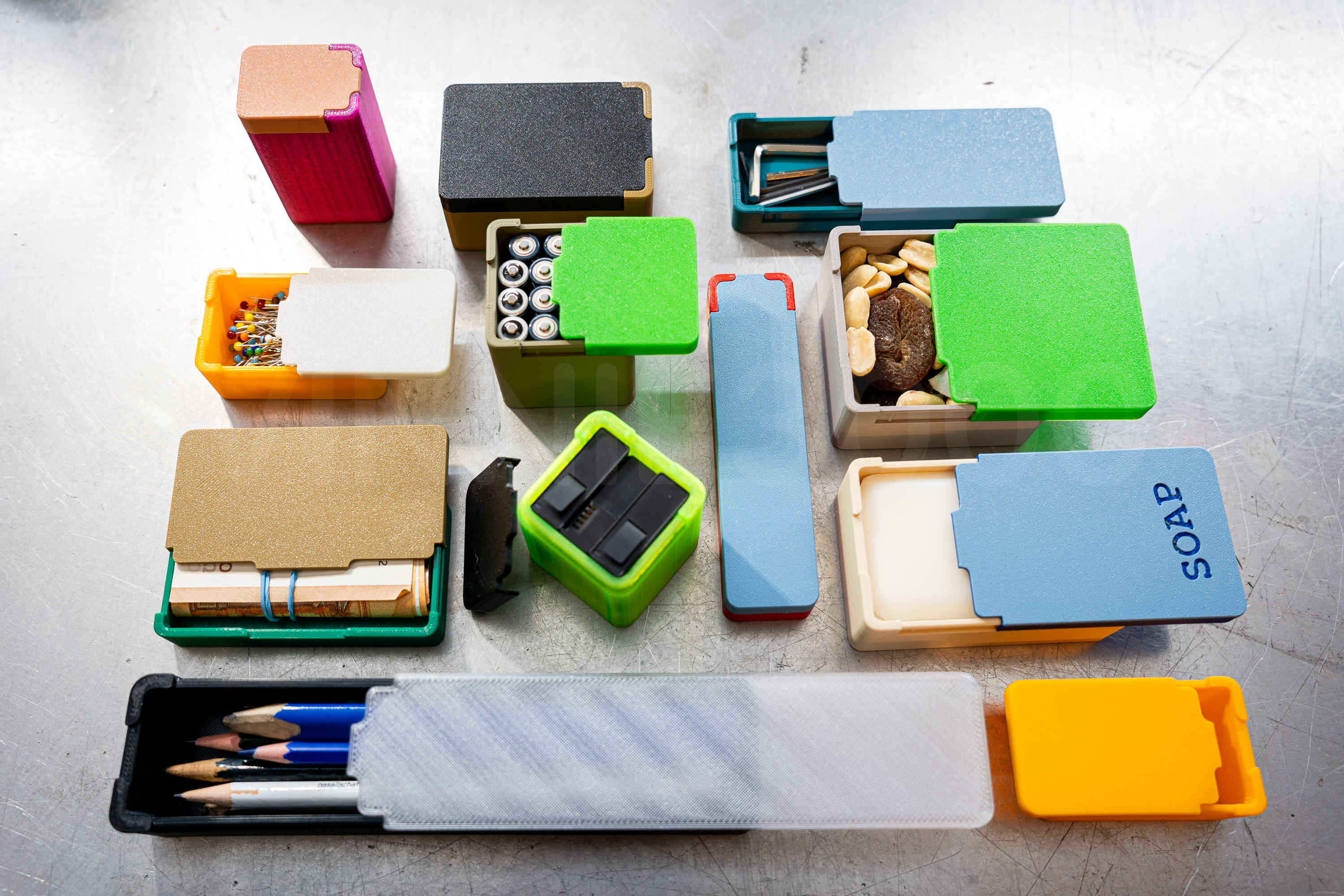
Hello! Parametric sliding lid boxes for everyone!
This means you can generate a box in whatever dimension you like, with several parameters that can be altered to your needs.
| UPDATE 1 25.05.25 | Version 1.2.1 is online! works well here, minor improvements, added some additional information in the spreadsheet, updated the .stl example models too. <3 |
Some information for you:
on printing:
- The boxes work very well both in PET-G and PLA. The sliding lid is a little snappier in PET-G, so I'd recommend PET-G.
- Print settings are up to you, infill percentage can be fairly low. Probably best use a 0.4mm nozzle but if you set the vertical wall-thickness to 4mm a 0.6 nozzle works great too.
- From all of the test prints I have done only one of my filaments does not seem to have the dimensional accuracy to fit the tolerances of the sliding mechanism. :) I print on a MKS3.5 and a mini both equipped with E3D Revo hotends.
on generating any size box you like via FreeCAD:
Included for download is the FreeCAD .FCStd file in which you can modify the boxes to your desire and export them as .stl files.
- The spreadsheet includes inside/outside dimensions of the boxes, depending on which is more important to you.
- You can find a PDF attached with some information on the dimensions of the box and how they are linked in the spreadsheet.
I have included some instructions in the spreadsheet to help you navigate any tinkering you might want to do.
a screenshot of the spreadsheet below:
- The parametric design is based on the outer dimensions of width and length, inside dimension of height, both are however shown, up to you to add wall-thickness to inside dimensions for W and L if you need something to fit precisely in to a box!
Instructions for those of you completely new to FreeCAD:
- download freecad here: https://www.freecad.org/downloads.php
- download SLIDE_BOX_FREECAD below.
- open the .FCStd file in the .zip you downloaded with freecad.
- in the model box on the left, double click ‘Spreadsheet’ to open the spreadsheet.
- in the spreadsheet you will find instructions on how to alter the dimensions of the box
- if you wish to see both the spreadsheet and the 3D viewport at the same time
select windows → tile from the top-down menu. - alter dimensions to your desire - detailed notes on what you can change are included in the spreadsheet.
- to export the box body and lid as .stl for printing select Body_BOTTOM in the model box and then click file → export and choose STL Mesh (*.stl *.ast) as your format.
- repeat the same for Body_TOP
- That's it, you've got your files for slicing and printing!
design/miscellaneous notes:
- The boxes have a little tab on the lid so you can easily open them with your thumb while holding the box, which I find very satisfying! Snap!
- The .STLs that are included in the model page are examples, if there are popular sizes people might suggest I add I can do so.
Happy printing and organizing and feel free to have a look at my other models!
I'd be happy to see your makes, get some feedback and I am of course open to ideas and improvements, I might then update an updated model with alterations if there is enough interest. Don't forget to save and like the model! (but only if you actually like it, of course!) <3
storage boxes with sliding lid (in all sizes, parametric - FreeCAD 1.0.0)
by VINNIE3000 · original on Printables ↗
Hobby & Makers / Organizers
♥ 1.2k⬇ 2.7k🖨 28 prints
Print profiles
45x75x50_container.stlDEFAULT
⏱ time and weight estimated after preparation · 1 material(s)
Made to order: we prepare this file when you order, which adds a few minutes before printing starts.
Prints on: A1 mini 0.4PLA
Order this print
45x75x50_lid.stl
⏱ time and weight estimated after preparation · 1 material(s)
Made to order: we prepare this file when you order, which adds a few minutes before printing starts.
Prints on: A1 mini 0.4PLA
Order this print
30x140x80_container.stl
⏱ time and weight estimated after preparation · 1 material(s)
Made to order: we prepare this file when you order, which adds a few minutes before printing starts.
Prints on: A1 mini 0.4PLA
Order this print
30x140x80_lid.stl
⏱ time and weight estimated after preparation · 1 material(s)
Made to order: we prepare this file when you order, which adds a few minutes before printing starts.
Prints on: A1 mini 0.4PLA
Order this print
25x50x30_container.stl
⏱ time and weight estimated after preparation · 1 material(s)
Made to order: we prepare this file when you order, which adds a few minutes before printing starts.
Prints on: A1 mini 0.4PLA
Order this print
25x50x30_lid.stl
⏱ time and weight estimated after preparation · 1 material(s)
Made to order: we prepare this file when you order, which adds a few minutes before printing starts.
Prints on: A1 mini 0.4PLA
Order this print
20x90x60_container.stl
⏱ time and weight estimated after preparation · 1 material(s)
Made to order: we prepare this file when you order, which adds a few minutes before printing starts.
Prints on: A1 mini 0.4PLA
Order this print
20x90x60_lid.stl
⏱ time and weight estimated after preparation · 1 material(s)
Made to order: we prepare this file when you order, which adds a few minutes before printing starts.
Prints on: A1 mini 0.4PLA
Order this print
15_25_40_lid.stl
⏱ time and weight estimated after preparation · 1 material(s)
Made to order: we prepare this file when you order, which adds a few minutes before printing starts.
Prints on: A1 mini 0.4PLA
Order this print
15_25_40_container.stl
⏱ time and weight estimated after preparation · 1 material(s)
Made to order: we prepare this file when you order, which adds a few minutes before printing starts.
Prints on: A1 mini 0.4PLA
Order this print