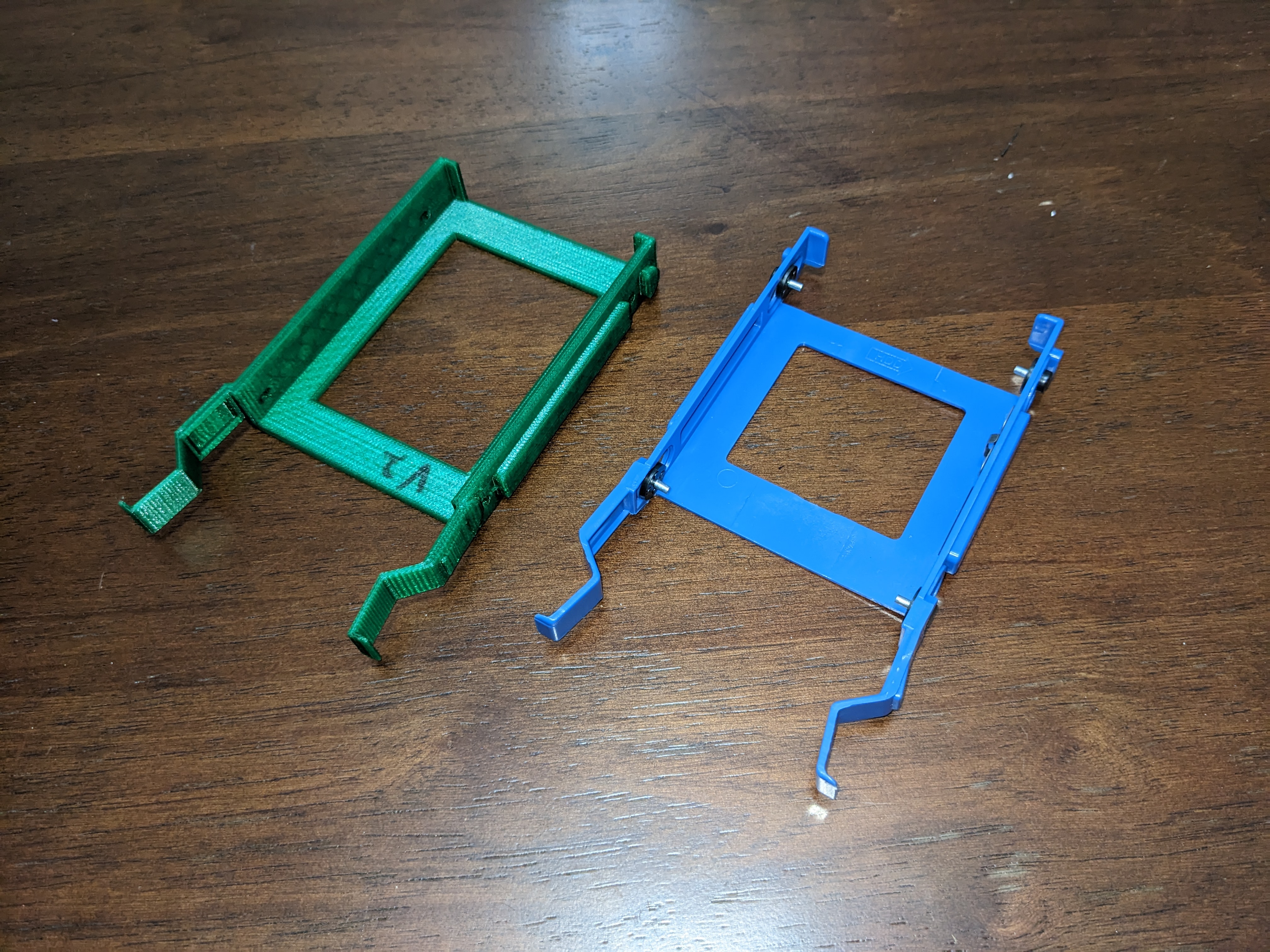
These parts are an alternative to the normal 2.5" caddy compatible with a smattering of Dell Optiplex Tower systems. I tested these models in a few Dell Optiplex 7060 Towers, and the printed parts had an excellent fit.
Update 2023-12-13: Added the quad countersunk model
Compatibility
The part this model replaces is Dell P/N X9FV3. Here is a short list of Dell Optiplex Tower models I think are compatible (based on reading compatible parts from ebay/amazon listings for X9FV3):
Optiplex 3040, Optiplex 3046, Optiplex 5040, Optiplex 7040
Optiplex 3050, Optiplex 5050, Optiplex 7050
Optiplex 3060, Optiplex 5060, Optiplex 7060,
Optiplex 3070, Optiplex 5070, Optiplex 7070
There are likely other dell systems that support this model. If your dell supports P/N X9FV3, it is likely to support this model as well.
Model info
Included are 3 different models (.stl and .step of each).
Single_standard
This is the regular model. It should take normal 2.5" drives, and fit normal M3x6mm screws. I purchased these screws: https://www.amazon.com/gp/product/B012TE12CY/
Print this model if you don't know which one is for you
Single_countersunk
This model is similar to the first, with the only difference being that it accepts countersunk screws. I created this model if you already have countersunk screws from using the triple_countersunk model. M3x6mm countersunk screws are appropriate
Triple_countersunk
This model is special, as it enables three 2.5" drives to be installed in the two factory slots with one caddy. This model requires countersunk screws, as the middle drive's screws would otherwise contact the metal drive enclosure present in the Dell Optiplex tower. M3x6mm countersunk screws are appropriate.
Quad_countersunk
Just like triple_countersunk, only with a bonus drive! Requires more cooling, is likely less compatible with thicker drives. I installed four 7mm thick Samsung drives. Your mileage may vary.
Printing info
I printed mine in PETG, since some drives can get rather toasty. These particular Dell machines don't provide much airflow to the drive area, so they may get rather hot. You are welcome to try with PLA
I selected “Supports: Support on build plate only” to ensure proper definition for all the overhangs, since they are somewhat critical and control how the caddy fits. For the Triple_countersunk model, you should paint on some supports to ensure the upper alignment bars are printed correctly. I did this when initially printing the model, but forgot to save the 3mf.
Dell Optiplex 2.5" Caddy
by 00Nave198 · original on Printables ↗
Gadgets / Computers
♥ 105⬇ 1.5k🖨 7 prints
Print profiles
hddcaddy_single_standard.STLDEFAULT
⏱ time and weight estimated after preparation · 1 material(s)
Made to order: we prepare this file when you order, which adds a few minutes before printing starts.
Prints on: A1 mini 0.4PLA
Order this print
hddcaddy_single_countersunk.STL
⏱ time and weight estimated after preparation · 1 material(s)
Made to order: we prepare this file when you order, which adds a few minutes before printing starts.
Prints on: A1 mini 0.4PLA
Order this print
hddcaddy_triple_countersunk.STL
⏱ time and weight estimated after preparation · 1 material(s)
Made to order: we prepare this file when you order, which adds a few minutes before printing starts.
Prints on: A1 mini 0.4PLA
Order this print
hddcaddy_quad_countersunk.STL
⏱ time and weight estimated after preparation · 1 material(s)
Made to order: we prepare this file when you order, which adds a few minutes before printing starts.
Prints on: A1 mini 0.4PLA
Order this print