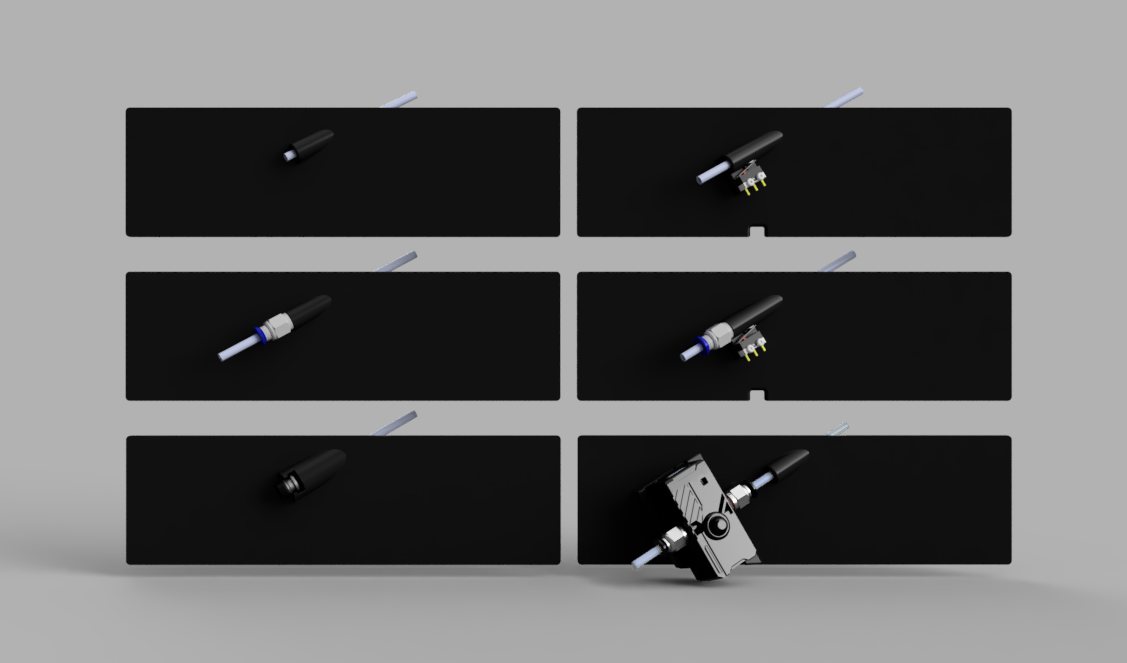
V0 Upper-Rear Bowden Inlet (URBI)
A Reverse Bowden Inlet for the upper-rear panel of the Voron Zero with an optional filament sensor.
There are 6 Variants:
- URBI - The basic, just a hole to pass the bowden tube through.
- URBI-PC4 - with a thread to install a PC4-M6 fitting
- URBI-ECAS4 - with an inverted ECAS4 fitting
- URBIFS - with a filament sensor
- URBIFS-PC4 - with a filament sensor, and a thread to install a PC4-M6 fitting
- URBI-SFS2 - For the BTT SFS V2.0
Filament sensor variants require a microswitch and 6x3mm magnet.
Assembly
URBI
URBI-PC4
URBIFS
URBIFS-PC4
URBI-ECAS4
URBI-SFS2
Configuring Filament Sensors
All filament sensor configurations assume you have a [respond] section defined in your configuration to enable the RESPOND gcode command.
_FS_RUNOUT Macro
This macro will be called when the filament sensor detects a runout/jam. feel free to customize this.
[gcode_macro _FS_RUNOUT]
gcode:
  M300 S660 P300  ; BEE
  M300 S440 P300  ; BOOP
  RESPOND TYPE=error MSG="Filament Runout"  ; Display a console message
  M117 "Filament Runout"  ; Display a message on the LCD
  PAUSE   ; Call the pause macro
_FS_ENABLE and _FS_DISABLE macros
These macros are used to enable the filament sensors during printing and disable them otherwise. These are optional, but whether or not you use them, you should still disable the sensors when they aren't required. sensors should be enabled in PRINT_START and RESUME, and disabled in PRINT_END, CANCEL_PRINT and PAUSE
[gcode_macro _FS_ENABLE]
gcode:
  SET_FILAMENT_SENSOR SENSOR=filament_switch ENABLE=1
  ; SET_FILAMENT_SENSOR SENSOR=filament_motion ENABLE=1  ; Uncomment this line if you are using the SFS V2

[gcode_macro _FS_DISABLE]
gcode:
  SET_FILAMENT_SENSOR SENSOR=filament_switch ENABLE=0
  ; SET_FILAMENT_SENSOR SENSOR=filament_motion ENABLE=0  ; Uncomment this line if you are using the SFS V2


# THESE ARE JUST EXAMPLES
# You should modify your own macros to include the calls to _FS_ENABLE and _FS_DISABLE

[gcode_macro PRINT_START]
gcode:
    G28                            ; home all axes
    G90                            ; absolute positioning
    G1 Z20 F3000                   ; move nozzle away from bed
    _FS_ENABLE                     ; enable the filament runout sensor(s)


[gcode_macro PRINT_END]
gcode:
    M400                           ; wait for buffer to clear
    G92 E0                         ; zero the extruder
    _FS_DISABLE                    ; disable the filament runout sensor(s)
    ; ... etc ...


[gcode_macro CANCEL_PRINT]
rename_existing: CANCEL_PRINT_BASE
gcode:
  _FS_DISABLE
  CANCEL_PRINT_BASE


[gcode_macro PAUSE]
rename_existing: PAUSE_BASE
gcode:
  _FS_DISABLE
  PAUSE_BASE


[gcode_macro RESUME]
rename_existing: RESUME_BASE
gcode:
  _FS_ENABLE
  RESUME_BASE
URBIFS Basic Runout Sensor
[filament_switch_sensor filament_switch]
switch_pin: ^PC15    # Use the correct pin for your mainboard.
pause_on_runout: False
runout_gcode: _FS_RUNOUT
BigTreeTech SFS V2.0
NOTE: The SFS V2.0 includes both a motion and switch sensor, include the above filament_switch definition in addition to the one below.
[filament_motion_sensor filament_motion]
switch_pin: ^PC12    # Use the correct pin for your mainboard.
extruder: extruder
pause_on_runout: False
detection_length: 2.88
runout_gcode: _FS_RUNOUT
The most up-to-date version of this mod can always be found on GitHub.
V0 Upper-Rear Bowden Inlet (URBI) for Voron V0
by Maple Leaf Makers · original on Printables ↗
3D Printers / Other Printer Parts & Upgrades
♥ 387⬇ 2.1k🖨 48 prints
Print profiles
URBI-ECAS4.stl
⏱ time and weight estimated after preparation · 1 material(s)
Made to order: we prepare this file when you order, which adds a few minutes before printing starts.
Prints on: A1 mini 0.4PLA
Order this print
URBI.stlDEFAULT
⏱ time and weight estimated after preparation · 1 material(s)
Made to order: we prepare this file when you order, which adds a few minutes before printing starts.
Prints on: A1 mini 0.4PLA
Order this print
URBIFS.stl
⏱ time and weight estimated after preparation · 1 material(s)
Made to order: we prepare this file when you order, which adds a few minutes before printing starts.
Prints on: A1 mini 0.4PLA
Order this print
URBIFS-PC4.stl
⏱ time and weight estimated after preparation · 1 material(s)
Made to order: we prepare this file when you order, which adds a few minutes before printing starts.
Prints on: A1 mini 0.4PLA
Order this print
URBI-PC4.stl
⏱ time and weight estimated after preparation · 1 material(s)
Made to order: we prepare this file when you order, which adds a few minutes before printing starts.
Prints on: A1 mini 0.4PLA
Order this print
URBI-SFS2.stl
⏱ time and weight estimated after preparation · 1 material(s)
Made to order: we prepare this file when you order, which adds a few minutes before printing starts.
Prints on: A1 mini 0.4PLA
Order this print