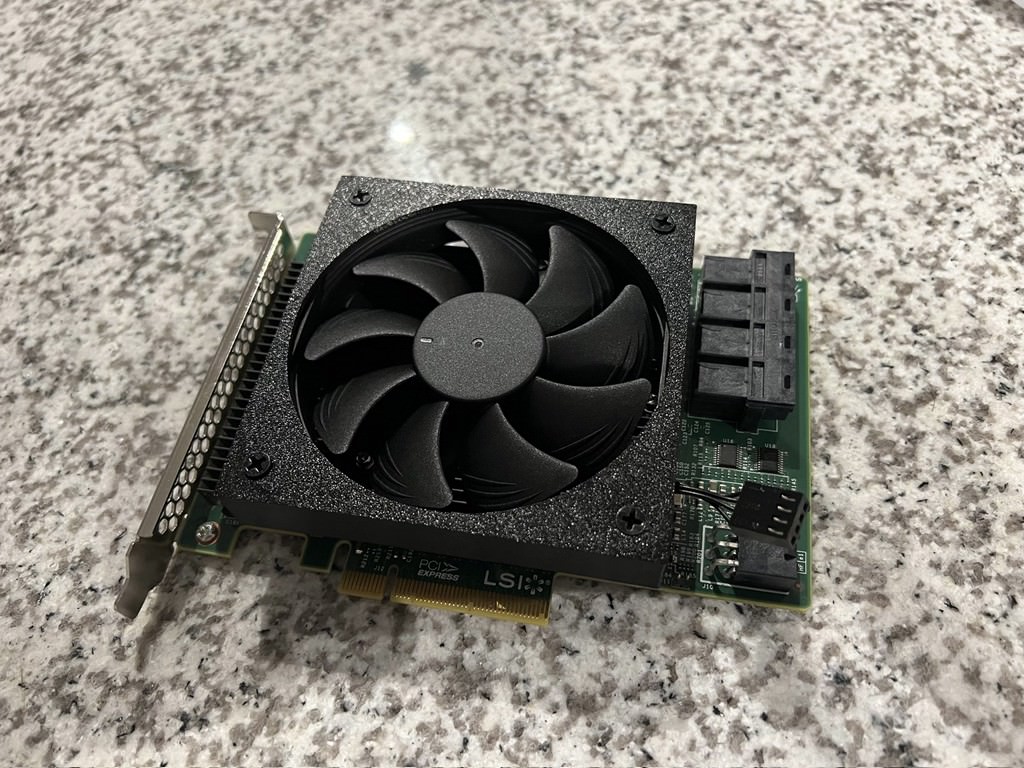
This is an older design. Please consider also checking out this one created by @briancmoses :
https://www.printables.com/model/1046107-lsi-9300-16i-hba-cooling-fan-shroud
This HBA runs pretty hot and I wanted to mount a fan to it instead of buying some cheap PCI slot fans. I recommend to print in PETG. After attaching the fan, the card will take up 2 PCI slots.
Parts:
LSI 9300-16i
Noctua NF-A9x14 HS-PWM chromax.Black.swap, Premium Quiet Slim Fan, 4-Pin (92x14mm, Black)
Printed face down with supports everywhere. I placed the rubber pieces on BOTH sides of the fan. Tricky to fit the fan in the shroud, be sure to put cable through the hole and orient fan to blow on the heatsink. You may need to bend the shroud clips. To attach to the heatsink, mount top clip into position and mind to not bump any SMD components. Then attach bottom clip, you may need to flex the fan shroud, once top and bottom are clipped slide the shroud to the left so the right clip is also mounted. It should be a tight fit and not slide around.
LSI 9300-16i Noctua NF-A9x14 Fan Shroud
by Horbit · original on Printables ↗
Gadgets / Computers
♥ 71⬇ 1.0k🖨 6 prints
Print profiles
LSI_9300-16I_Noctua_92mmx14mm_Shroud.3mfDEFAULT
⏱ time and weight estimated after preparation · 1 material(s)
Made to order: we prepare this file when you order, which adds a few minutes before printing starts.
Prints on: A1 mini 0.4PLA
Order this print
LSI_9300-16I_Noctua_92mmx14mm_Shroud.stl
⏱ time and weight estimated after preparation · 1 material(s)
Made to order: we prepare this file when you order, which adds a few minutes before printing starts.
Prints on: A1 mini 0.4PLA
Order this print