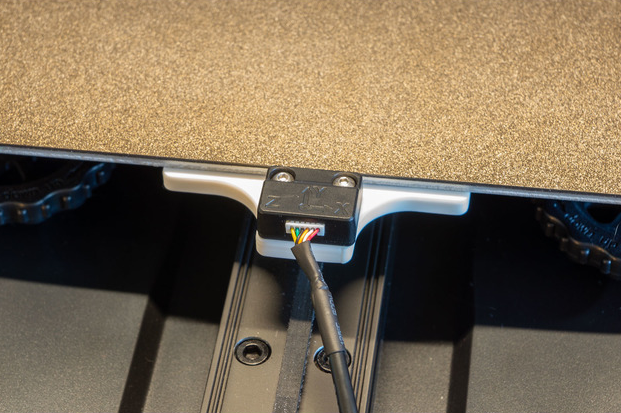
Bracket mount, for the Y axis, to calibrate the input shaping on your Sonic Pad with the provided ADXL345 accelerometer on an Ender3 S1 or S1 Pro. Install it in the front of the bed where the handle typically goes. That way no clip or tape/glue required and it's centered on the axis.
Instructions
Print flat, no support required.
Printed in 0.2mm.
For the calibration (input shaping) itself:
- I recommend to set up your printer as if you were going to do a print (filament loaded)
- Place the printed bracket on the printer and mount the sensor to it
- With the screws/bolts provided with your Sonic Pad and the ones you remove you should be able to find two couples that matches your need in length.
- On the Sonic Pad (Klipper) go to:
- Configure
- Other settings
- Advanced options
- Measuring Resonance
- Let it perform on the X axis, see the other print you might want to use here:
https://www.printables.com/fr/model/332066-creality-sonic-pad-sensor-bracket-x-axis - Then make it perform on the Y axis
Once done you can remove the part and store it somewhere. You might want to use later, for example it if you change something on your printer or change its location.
Credits
This model was uploaded by TimCC on Thingiverse.
Creality Sonic Pad - Sensor bracket (Y axis)
by J0kers · original on Printables ↗
3D Printers / Accessories
♥ 144⬇ 1.5k🖨 12 prints
Print profiles
Sensor bracket (Y axis) for Ender3 S1 and S1 Pro.stlDEFAULT
⏱ time and weight estimated after preparation · 1 material(s)
Made to order: we prepare this file when you order, which adds a few minutes before printing starts.
Prints on: A1 mini 0.4PLA
Order this print