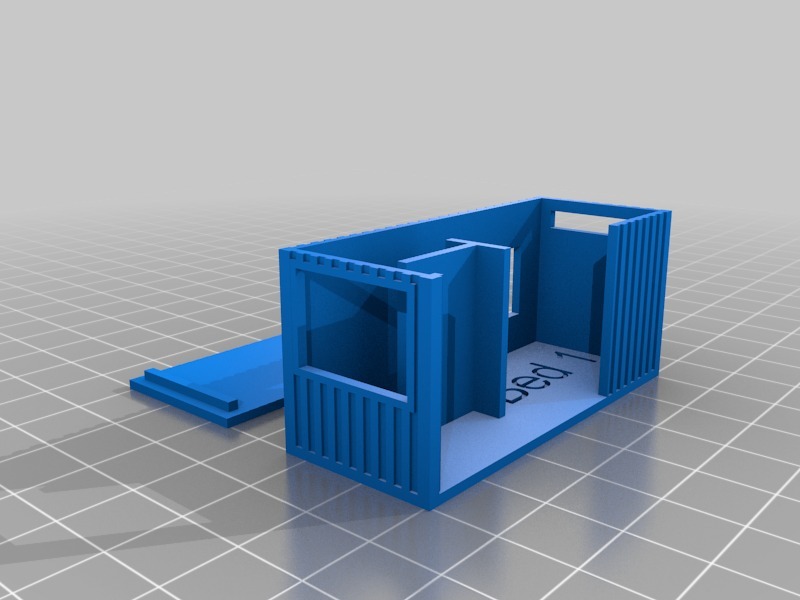
An OpenSCAD script to create models of shipping containers for home design.
- Specify the container size (20' or 40')
- Specify the container height (standard or High Cube)
- Specify the scale e.g. 1:100
- Decide if you want the 'ridges' or not
- Decide if you want a roof lid printing or not
- Define any number of openings, windows, internal walls and text
To define various aspects of the container, find the 'CONTAINER = [' line in the script, then add as many items as you like (the script comes with a sample - you'll obviously want to replace the items, but they serve as a good example of how to create a container).
Opening
A hole in the container from floor to ceiling.
Example: opening(dir="s", x=0.25, width=4),
- dir: the side you want the opening on... "n", "s", "e", "w"
- x: the position (in m) to start the opening
- width: the width (in m) of the opening
Window
A window in the container (you'll need to include platforms when slicing)
Example: window(dir="n", x=0.75, y=0.8, width=1.8, height=1.2),
- dir: the side you want the window on... "n", "s", "e", "w"
- x: the position (in m) to start the window
- y: the height off the ground (in m) of the window
- width: the width (in m) of the window
- height: the height (in m) of the window
Wall
An internal wall in the container.
Example: wall(dir="h", x=1, y=1.2, length=1.5),
- dir: the horizontal/vertical direction of the wall... "h", "v"
- x: the position (in m) to start the wall
- y: the position (in m) to start the wall
- length: the length (in m) of the wall
Text
Text embedded in the floor of the container (unfortunately it can'tyet be rotated)
Example: text(text="Bed 1", x=3.0, y=1.7, size=8),
- text: the text to show (keep it short!)
- x: the position (in m) to start the text
- y: the position (in m) to start the text
- size: the text font size
Walls and Text are a bit hit and miss... keep adjusting the values and previewing the model until it looks good!
Note: I'm new to this OpenSCAD stuff, so happy to hear comments/suggestions for improvements :D
Print Settings
Printer Brand:
RepRap
Printer:
Prusa i3
Rafts:
No
Supports:
Yes
Resolution:
0.2mm
Infill:
25%
Notes:
Supports are only required if you have any windows in the container.
Category: Buildings & StructuresParametric Shipping Container
by Mark · original on Printables ↗
World & Scans / Architecture & Urbanism
♥ 75⬇ 534🖨 2 prints
Print profiles
Shipping_Container_-_Sample.stlDEFAULT
⏱ time and weight estimated after preparation · 1 material(s)
Made to order: we prepare this file when you order, which adds a few minutes before printing starts.
Prints on: A1 mini 0.4PLA
Order this print
Shipping_Container_-_20.stl
⏱ time and weight estimated after preparation · 1 material(s)
Made to order: we prepare this file when you order, which adds a few minutes before printing starts.
Prints on: A1 mini 0.4PLA
Order this print
Shipping_Container_-_40.stl
⏱ time and weight estimated after preparation · 1 material(s)
Made to order: we prepare this file when you order, which adds a few minutes before printing starts.
Prints on: A1 mini 0.4PLA
Order this print