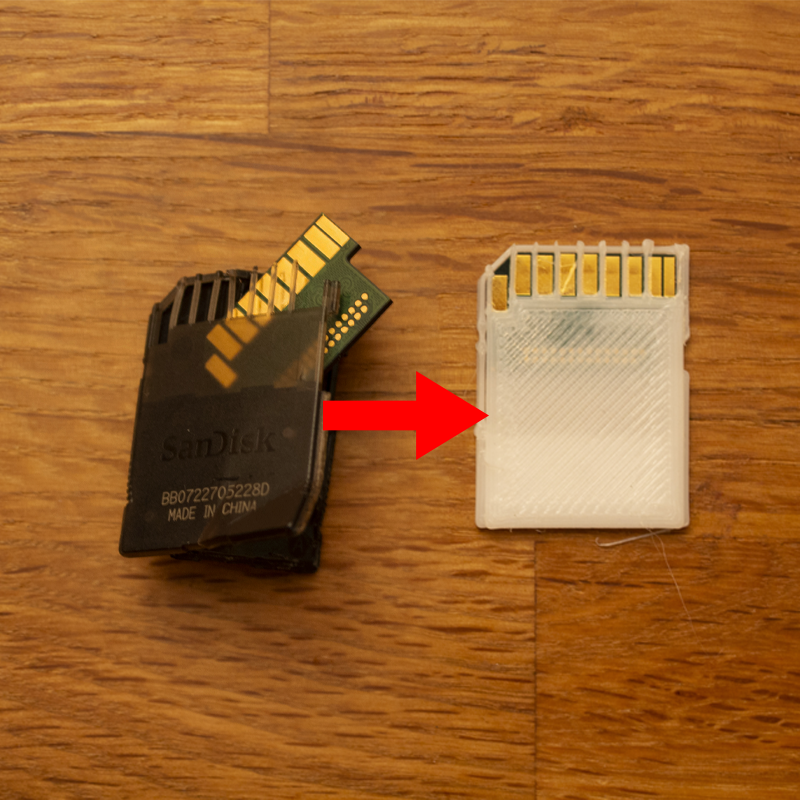
Use this sd card hull if your sd card has physical damage and is unreadable or not recognized by the pc.
A while back the plastic hull of my sd card broke and it was no longer recognized by the pc. Using this model I was able to put the pcb inside the sd card inside the 3d printed hull and I was able to save all my data.
INSTRUCTIONS
Remove the pcb from the damaged sd card(Picture 2). Place it into the 3d printed part and secure it with one drop of superglue on the back (Picture 3). Secure the second 3d printed part in place using a second drop of glue (Picture 1). Do not use too much glue. If your printer has problems printing fine detail clean up the part using a sharp knive.
Visit my Blog for more projects like this one!
https://blog.hirnschall.net
Print instructions
If possible print with "single extrusion walls" enabled.
Use "high quality" print settings and PLA for best results.
Fix broken SD Card (3d-print plastic hull)
by Sebastian · original on Printables ↗
Gadgets / Computers
♥ 62⬇ 1.1k🖨 3 prints
Print profiles
bottom.stlDEFAULT
⏱ time and weight estimated after preparation · 1 material(s)
Made to order: we prepare this file when you order, which adds a few minutes before printing starts.
Prints on: A1 mini 0.4PLA
Order this print
top.stl
⏱ time and weight estimated after preparation · 1 material(s)
Made to order: we prepare this file when you order, which adds a few minutes before printing starts.
Prints on: A1 mini 0.4PLA
Order this print